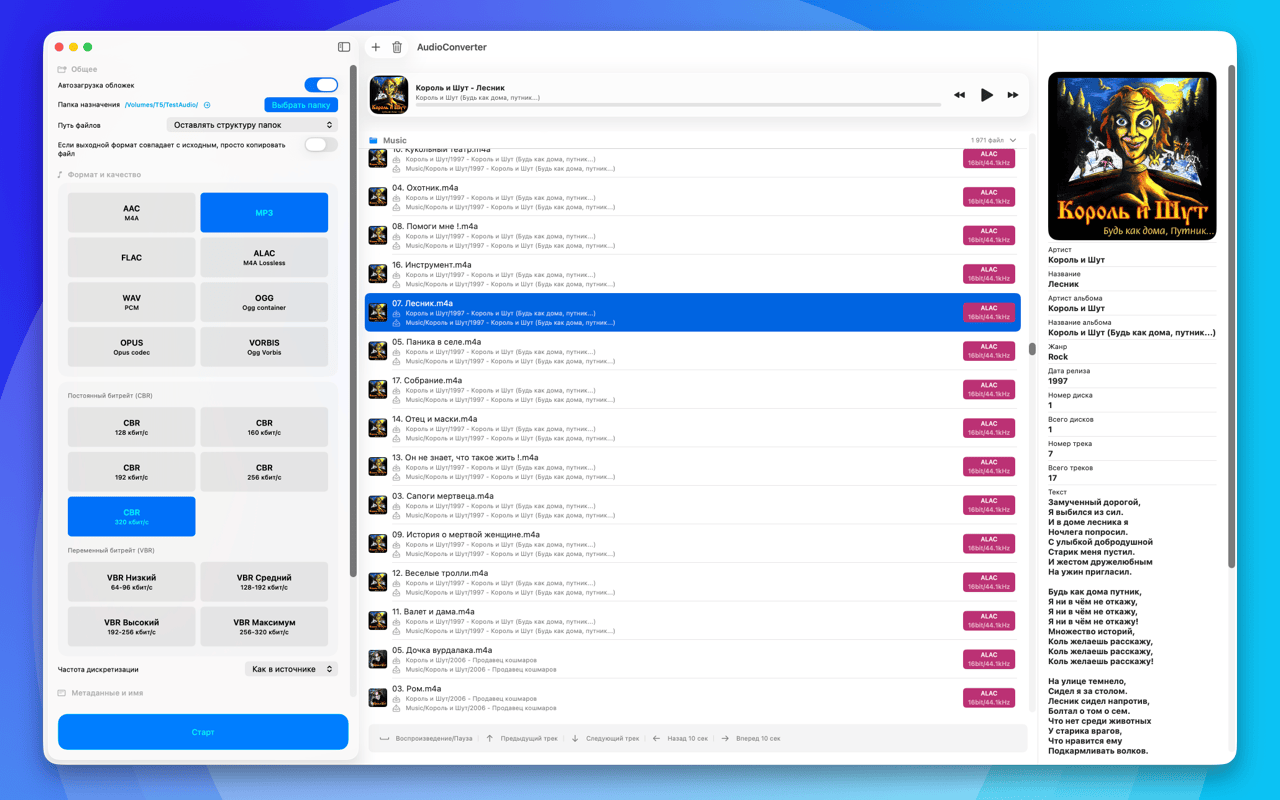
AudioConverter 27.9.10
converts audio quickly and accurately between MP3, AAC, ALAC, FLAC, WAV, AIFF, OGG, OPUS and VORBIS: batch processing, metadata and artwork, EBU R128 loudness normalization, and spectral analysis of your files.

converts audio quickly and accurately between the popular formats: MP3, AAC, ALAC, FLAC, WAV, AIFF, OGG, OPUS and VORBIS. Batch processing, metadata and artwork transfer, flexible quality settings, and a workflow that makes sense for everyday work with a music library.
And it does more than shuffle bytes around. It shows you what is really inside a file, brings loudness in line with the broadcast standard, and warns you when the settings you picked make no sense.
CONVERSION
• Output formats: MP3, AAC, ALAC, FLAC, WAV, AIFF, OGG, OPUS, VORBIS
• Input also accepts WavPack, AIFF, CAF, M4A and M4R
• Extract the audio track from video files
• Split a disc image (one large FLAC or WAV plus a CUE) into individual tracks: names and tags come from the CUE sheet
• Batch processing of individual files and whole folders
• A size forecast before you start, with a warning about pointless settings, such as re-encoding from lossy to lossless
QUALITY
• CBR, VBR and ABR, bitrate, sample rate and bit depth for the formats that support them
• The HE-AAC and HE-AAC v2 profiles for AAC
• Resampling with a choice of algorithm quality, up to mastering grade and minimum phase
• Dithering with noise shaping: applied only when the bit depth actually drops
LOUDNESS
• EBU R128 normalization, per track or per album, targeting -23, -18 or -14 LUFS
• Your choice: write ReplayGain tags, or apply the gain to the audio itself
• Clipping protection and a manual ±dB gain
ANALYSIS
• A spectrogram of the whole file: zoom, panning, a choice of FFT window, PNG export
• Cutoff frequency detection, telling you when a "lossless" file was in fact made from a lossy source
• A live spectrum while you listen
• SHA-256 and MD5 checksums to confirm the source file is the one you think it is
PROCESSING
• Fade in and fade out
• Silence trimming at the start and at the end
• Mono downmix and single-channel selection
FILES AND METADATA
• Metadata preserved and carried over, artwork included
• Customisable filename templates and overwrite rules
• Output layout: by artist, by artist and album, everything in one folder, or keeping the original structure
WITHOUT THE WINDOW
• Conversion straight from the clipboard: a menu bar icon and the ⌃⌥⌘C shortcut
• Settings move as a single file: export and import
INTERFACE
• Clean and minimal, fully translated into 15 languages: English, German, Russian, Spanish, French, Portuguese (Brazil), Italian, Japanese, Simplified Chinese, Korean, Dutch, Polish, Slovak, Turkish and Swedish
Versionsverlauf
Ein großer Ordner wird hinzugefügt, ohne das Fenster einzufrieren: Das Durchsuchen läuft jetzt im Hintergrund.
Die Dateiliste reagiert wieder auf die Tastatur: Pfeiltasten wechseln die Datei, die Leertaste startet und pausiert.
Der Player zeigt nach dem selbsttätigen Wechsel zum nächsten Titel korrekt Pause an, und die Pfeiltasten spulen um die versprochenen 10 Sekunden.
Klangbearbeitung hinzugefügt: Ein- und Ausblenden, Abschneiden der Stille an beiden Enden, manueller Gain, Zusammenlegen auf Mono und Auswahl eines einzelnen Kanals.
Auswahl der Resampling-Qualität hinzugefügt, dazu Dither: Er schaltet sich von selbst ein, sobald die Bittiefe wirklich sinkt.
AIFF als Ausgabeformat hinzugefügt, ebenso die durchschnittliche Bitrate (ABR) und die Profile HE-AAC und HE-AAC v2.
Das Spektrogramm kann jetzt echtes Zoomen mit Neuberechnung, die Wahl des FFT-Fensters, den Export als Bild und ein Live-Spektrum während der Wiedergabe.
Vorhersage der Dateigröße hinzugefügt, samt Warnungen vor sinnlosen Einstellungen wie lossy zu verlustfrei.
Prüfsummen SHA-256 und MD5 hinzugefügt, um zu bestätigen, dass die Quelldatei die richtige ist.
Einstellungen lassen sich als einzelne Datei exportieren und wieder importieren.
Konvertierung direkt aus der Zwischenablage: Symbol in der Menüleiste und ⌃⌥⌘C, ganz ohne Fenster.
Spektrogramm
• Spektrogramm der gesamten Datei – mit Zoom, Verschieben, wählbarem FFT-Fenster und PNG-Export.
• Die App ermittelt die Grenzfrequenz und weist darauf hin, wenn eine „verlustfreie“ Datei in Wahrheit aus einer verlustbehafteten Quelle stammt.
• Live-Spektrum direkt beim Anhören.
Lautheit
• Normalisierung nach EBU R128 – pro Titel oder pro Album, mit Ziel −23, −18 oder −14 LUFS.
• Wahlweise ReplayGain-Tags schreiben oder die Verstärkung auf das Audiomaterial selbst anwenden.
• Schutz vor Übersteuerung und manuelle Verstärkung in ±dB.
Verarbeitung
• Neuabtastung mit wählbarer Algorithmus-Qualität – bis hin zu Mastering und minimaler Phase.
• Dithering mit Noise Shaping: nur dann aktiv, wenn die Bittiefe tatsächlich sinkt.
• Ein- und Ausblenden, Stille an den Rändern kürzen, Mono-Downmix und Kanalauswahl.
Dateien
• Tonspur aus Videodateien extrahieren.
• Namensvorlagen und Ordnerstruktur: nach Interpret, nach Interpret und Album, alles in einen Ordner oder unter Beibehaltung der ursprünglichen Struktur.
• Größenprognose schon vor dem Start – mit Hinweis auf sinnlose Einstellungen, etwa beim Umwandeln von verlustbehaftet nach verlustfrei.
Sprachen
• Die Oberfläche ist jetzt in 14 Sprachen übersetzt: Englisch, Deutsch, Russisch, Spanisch, Französisch, Portugiesisch (Brasilien), Italienisch, Japanisch, Chinesisch (vereinfacht), Koreanisch, Niederländisch, Polnisch, Türkisch und Schwedisch.